
Once you have FreeMusicDistribution.io account, you will be able to access your Tableau de bord de distribution de musique.

Then, just follow these few steps to upload your first album, compilation, or single on more than 220 social and digital platforms of your choice with FreeMusicDistribution.io:
1) Appuyez sur le bouton "Créer une release"

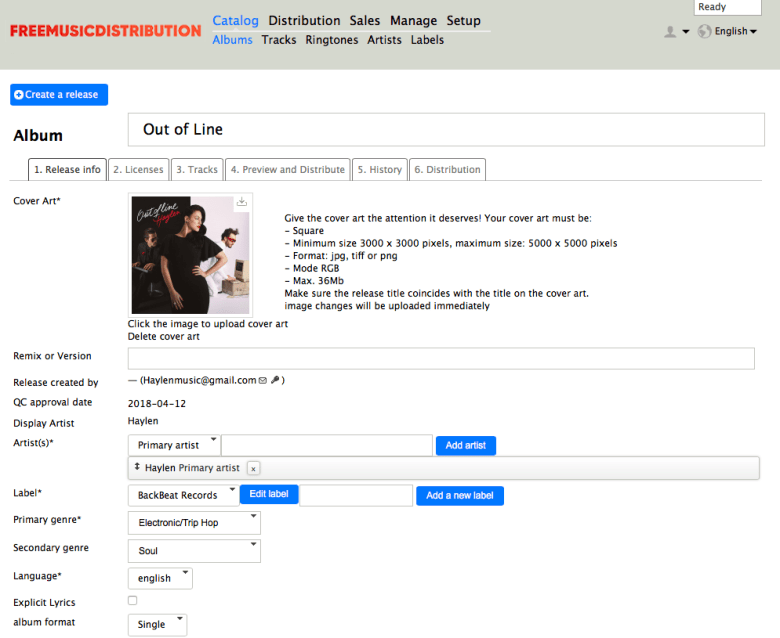
2) Téléchargez la pochette et remplissez les informations de votre single/album
- Give a name to your album (single or album, it’s the same process).
- Fill in the artist(s) of your record (performers, composers, authors …).
- Fill in the label. Put FMDistro label OR créez votre propre étiquette.
- Fill in the main and secondary genre of your release.
- Fill in the language and format of your release (Single, EP, or Album).
Important:
L'ART DE LA COUVERTURE N'EST PAS UNE PUBLICITÉ !
Your visual must just include the same indications you put in the forms (metadatas) such as the name of the artist(s), of the album (or single), the label, or eventually the “Parental Advisory” logo (in case you select explicit lyrics).
Do not add more information not indicated in the forms (metadatas) such as another title, artist, the CD logo, stereo, social network profile, website address, phone number, or any other “marketing” addition (like best rapper of the year, producer of… soundtrack from…). This is prohibited by platforms and we will not be able to deliver your music!
3) Licenses & Copyrights
- Fill in the price of your release (Budget, Mid, Full, or Premium). This is the price for downloading services like iTunes or Amazon. It doesn’t change anything for streaming platforms.
- Fill in the release date of your release (Digital and Original Release Date).
- Fill in owners of the license and publishing rights (your name if any).
- Indicate the territories where you wish to release (you can select what you want but be careful because if you don’t select “Entire World,” some platforms will not be delivered).

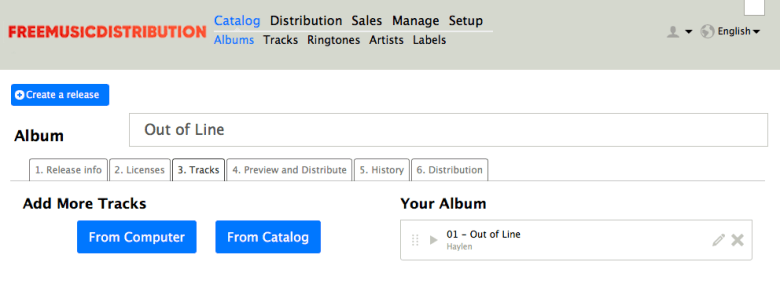
4) Téléchargez et éditez les pistes de l'album (ou du single)
- Upload your audio file(s). Minimum wav or flac (44.1khz/16Bits/Stereo).
- Vérifier formats et exigences des fichiers audio. If you have problems uploading your files, it means that your files are not in the correct format. Convert them with a free online converter to be sure that there is no problem.
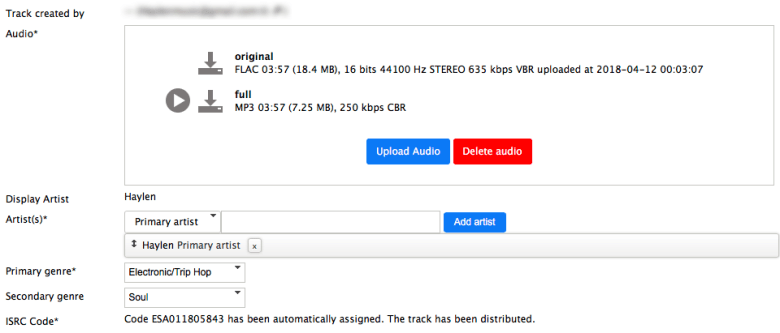
- Edit each track by clicking on the little pen. Informations must match informations you put in tab 1 “Release Info”.
- Be careful about punctuation and conjugation as well as the spaces you include, all must match.
Audio Analysis: If you see a little warning sign ⚠️on your track, read this article: More Information about Audio Analysis. Notez que ce message ne bloque pas la validation de votre version, c'est juste un outil informatif.
Important:
N'OUBLIEZ PAS DE MODIFIER VOS PISTES AUDIO APRÈS LES TÉLÉCHARGER EN CLIQUANT SUR L'ICÔNE CRAYON.
Provide again all the same information you put on tab 1 “Release Info” for each track. Information must match. On each track: the artist(s), composer(s), label and publishing rights (put your name or artist name if you don’t have one), language(s) of the song(s) (or “No Linguistic Content” for an instrumental track).
Metadatas are important for you and platforms, so please be careful to correctly add them everywhere, in your album and in each track(s) (Only putting the right information in your album is not sufficient, as each track(s) must also have metadatas for platforms).
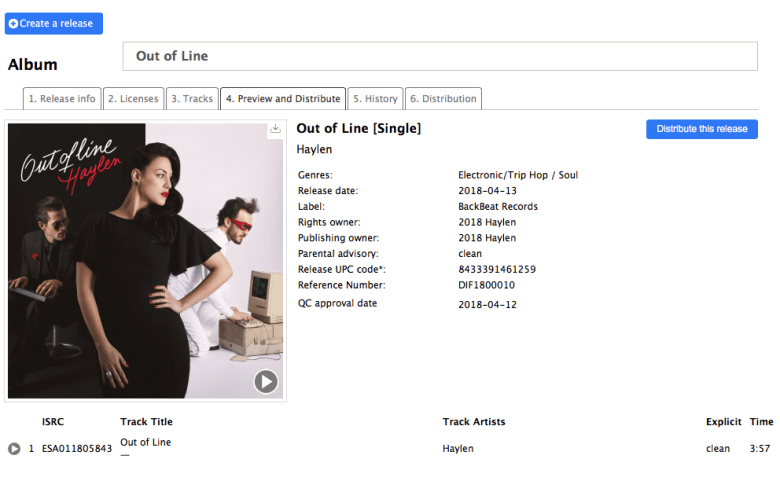
5) Prévisualisez et distribuez votre single/album
- Verify all information of your release.
- Click on “Distribute this release”.
6) Choisissez les plateformes sur lesquelles vous souhaitez distribuer votre single/album
- Select the platforms where you want to distribute and click “Next”.
- A new window appears, you are in the shopping cart. Scroll down and click “Order”.
- Validate the steps until the end of the payment/validation process. Sometimes, the system may ask you to pay 0 Euros, if this is the case, click on pay and don’t worry, it will not require any payment!
Vous pourrez alors suivre l'avancement de la livraison de votre musique sous l'onglet « 5. Historique » de vos albums, comme pour consulter vos ventes depuis votre tableau de bord !

Si un panneau d'avertissement apparaît près d'un quai, cela signifie que :
Your label is not yet authorized to distribute the album on the platform (Cliquez ici pour obtenir l'autorisation de diffusion sur Youtube Content ID, Beatport…), ou votre album ne peut pas être diffusé en raison d'un problème tel qu'un genre musical non accepté par la plateforme sélectionnée. Cependant, vous pouvez continuer votre diffusion sans ces plateformes pour le moment.
7) Comment savoir si le single/album a été validé et distribué ?
Il vous suffit de lire cet article.